evaluagent’s AutoQA can now check every conversation against your own policies, pulled straight from Confluence, Notion and SharePoint and score it using evidence from beyond the transcript – from CRM fields and wrap codes to silence and response times.
Picture a billing call that goes about as well as a billing call can. The agent is warm and clear, walks the customer through the refund process and promises a callback once it’s gone through. Read the transcript and you’d score it highly. Most automated QA would too.
But the callback was never logged. The wrap code says “general inquiry”. And the refund process the agent described so confidently changed last month, in a policy update that’s sitting in your knowledge base but never made it into your QA setup.
None of that shows up in the transcript, because the transcript only ever tells you what was said. A good outcome depends on two other things: what should have happened, according to your processes, and what actually happened once the conversation ended. From today, evaluagent is bringing both into scoring.
Where transcript-only QA falls short
Your quality standards don’t just live in your scorecards. They live in the SOPs, policy pages and process guides your teams keep in tools like Confluence, Notion and SharePoint – and they can change often. If your QA can’t see the current version, it’s scoring against a copy someone uploaded months ago, or against nothing at all.
Plenty of what makes a good interaction also happens off the call:
- Did the agent update the case?
- Apply the right disposition code?
- Reply within your SLA?
- Leave the customer in a minute of silence without explaining why?
Until now, checking that has meant a QA analyst flicking between systems, a quality picture with gaps in it, or a workaround someone had to build and maintain.
Your knowledge, connected and always current
With our new Knowledge Base Integrations, you can connect evaluagent directly to the tools where your knowledge already lives. Confluence, Notion and SharePoint are all available now (more to come!), and every connection is read-only, so evaluagent reads the documents you choose and never changes anything at the source.
Setup takes three steps – connect, choose what to sync, review – and from then on your documents keep themselves up to date. You choose how often evaluagent checks for changes, and edits, additions and deletions at the source flow through. Attach your documents to your AI line items, and when a policy changes, the knowledge those line items are scored against changes with it.
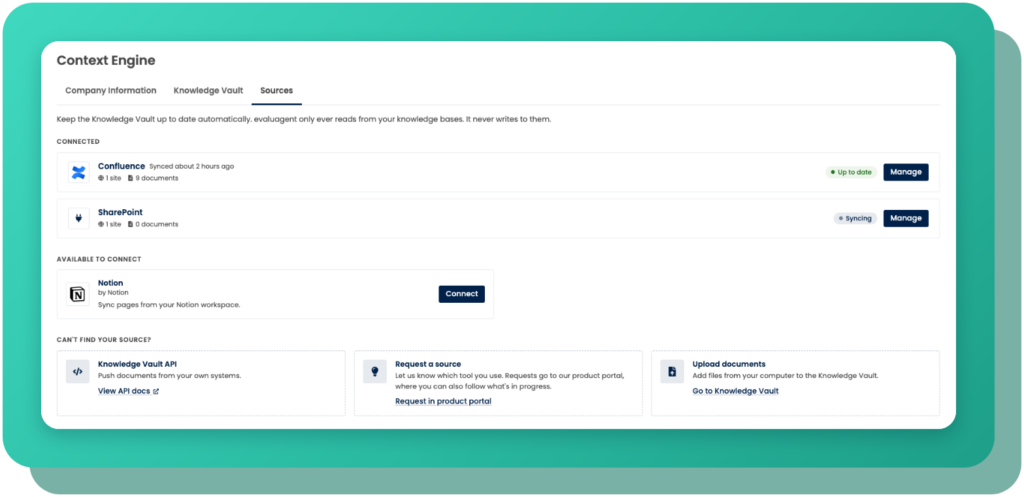
Everything is managed from one place, so you can see at a glance which connections are up to date, reconnect a broken connection in moments and tag documents in bulk – handy when a single sync brings in hundreds of pages. And if your knowledge lives somewhere we don’t integrate with yet, the Knowledge Vault API lets you push documents in directly.
Evidence from beyond the conversation
Knowing what good looks like is half the story. The other half is knowing what was actually done, and that’s where evaluating beyond the transcript comes in.
GenAI line items in evaluagent can now use additional evidence alongside the transcript. That might be:
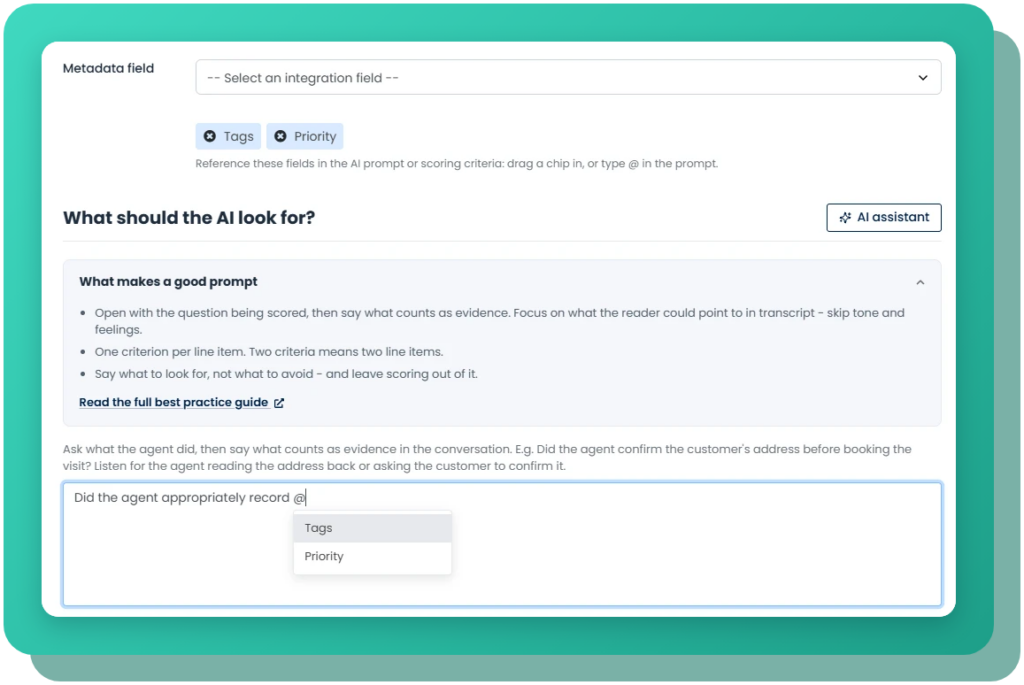
- metadata from your connected platforms, such as tags, wrap codes, subject, channel or case status
- audio data, like periods of silence and overtalk
- response times, including how long a customer waited for a first reply and the longest they waited for any reply – particularly useful for chat, messaging and email
You write the line item the same way you always have, in plain English, and reference the evidence with a simple @ mention: “Did the agent tag the conversation correctly using @Tag?” or “Pass if @First reply wait is under five minutes.” When the line item is scored, that reference is replaced with the real value for that conversation. Only the fields you select are shared with the AI – nothing else about the contact.
Better together: what was said, what was done and what should have happened
Both of these features are useful on their own. Together, they let AutoQA judge a conversation the way your best QA analyst would, with your policies to hand and the CRM open in the next tab.
So, back to that billing call. A single line item can now check whether the agent promised a callback, confirm from the case data whether one was actually booked and judge it all against the callback policy pulled from your knowledge base. A field value on its own only tells the AI that something is there. Your process documents tell it whether it’s right.
And because evaluagent is built to be explainable, you’re never asked to take a score just on trust.
Every result shows the evidence that was checked, the value it found and a short, plain-English summary of what the AI concluded, with a link through to the evidence itself. If a field was empty, that’s shown clearly rather than quietly left blank.
Built for human and AI agents
This matters even more as AI agents take on a bigger share of your conversations. An AI agent can sound entirely convincing as it tells a customer their refund is on its way. Going beyond the transcript lets you check whether that action really happened, and whether it matched your policy, using the same quality framework you already apply to your human team.
Keen to get started?
Book a demo and we’ll show you how you can get the full picture behind your own conversations.