A customer calls about a billing error. The agent is polite, follows the process, explains the fix and wraps up the call. On the scorecard, it’s a strong interaction. Three days later the same customer comes back via the chat, because the fix never landed.
Then they send an email.
Then they call again, and this time, they want to cancel.
Each of those conversations might pass QA on its own. But overall, the journey wasn’t a positive one.
Customer Journeys, now available in evaluagent, closes that gap. It groups every call, chat and email from the same customer into one journey, summarizes what happened, and suggests an outcome against the standard you set, whether that’s regulation like the FCA’s Consumer Duty, or your own complaints process.
One conversation is good. The whole journey is better.
Quality programs are usually built around evaluating a single interaction. Pick a contact, score it against your criteria, coach from what you find.
But today, customers move between channels, often several times to sort out a single issue, and the problems that cost you most – repeat contacts, complaints that never quite close, customers who give up – rarely sit neatly inside one conversation.
Until now, the only way to see that was to piece the story together by hand: pulling contacts from different systems into spreadsheets and working out what went wrong – if there was time to do it at all.
How do Customer Journeys in evaluagent work?
You tell evaluagent which fields identify the same customer across your systems – a customer ID or account number, for example, in your telephony and ticketing platforms. ‘Find journeys’ then pulls related contacts together, and you choose which ones become a journey.
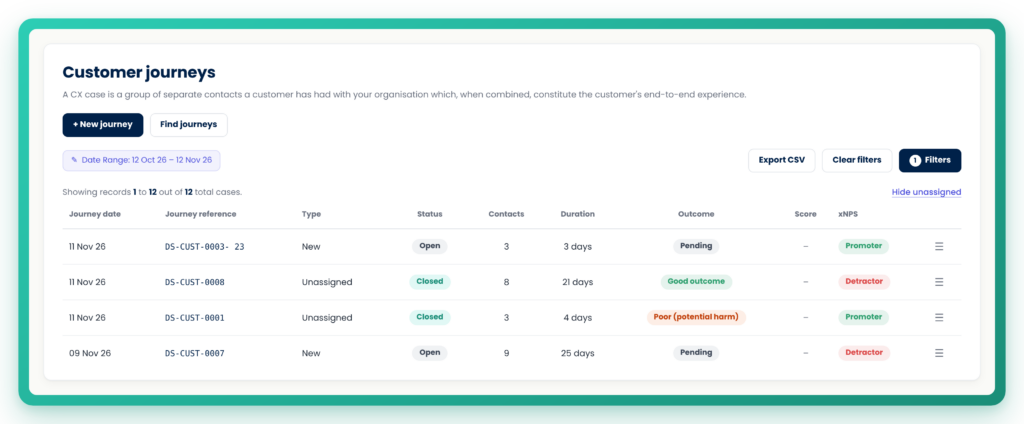
Each journey opens on a single view. You see every contact in order, with a short AI summary of each one, the agent who handled it, the customer’s sentiment and any vulnerability flags. A trend line shows how sentiment and xNPS moved from first contact to last. And where feedback, coaching sessions or remedial actions are linked to a contact, they sit right alongside it, so the evidence trail is in one place.
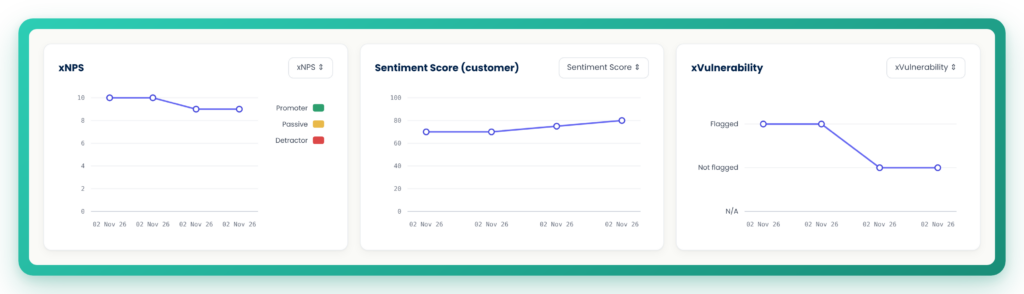
Judge the journey against your own standards
Journeys are assessed against a framework. You decide what matters across the whole experience: whether an affordability check happened before a payment plan was agreed, for example, or whether vulnerability was identified and supported from first contact to last.
evaluagent’s AI then suggests a result for each category and an overall outcome for the journey, with the reasoning behind it and a link to the contact where things fell short. Your team reviews it and agrees or disagrees. Reports, dashboards and exports only ever use the outcome a person has set, never an unreviewed suggestion. It’s quality you can explain, because a person signed it off and every result shows its reasoning.
Remedial Actions: proving it was put right
Finding a poor outcome is the start. Regulators in particular want firms to show that the issue was actually fixed, and most teams have been doing that outside their QA platform, in spreadsheets and bespoke tools. Remedial Actions, launching alongside Customer Journeys, bring it in.
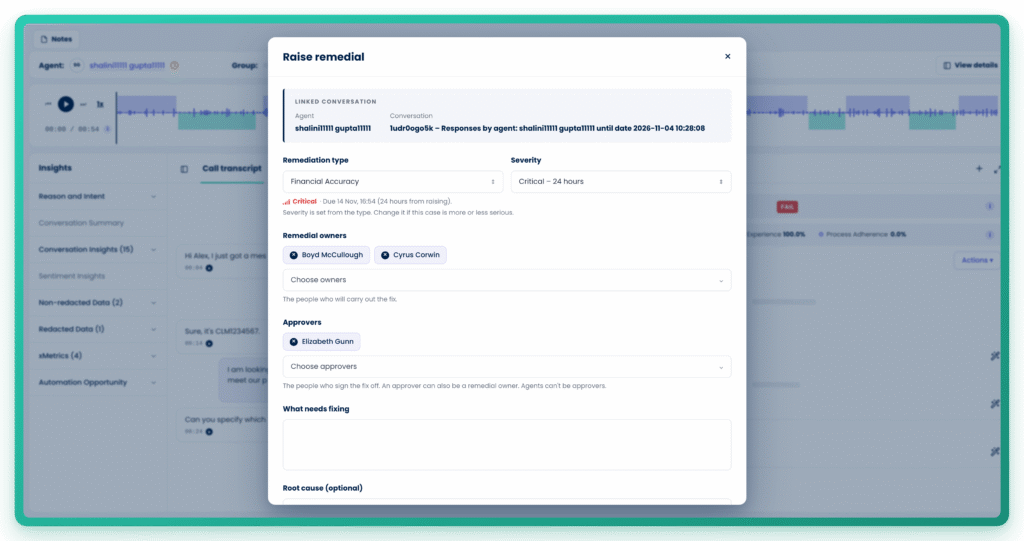
Raise a remedial action from the conversation where something went wrong, give it a type and a severity, and name an owner. Severity sets the SLA, so you can see at a glance what’s due and what’s breached. For higher-severity cases, you can require a named approver to check the work before it’s closed. Every step is recorded in an append-only audit trail, along with attachments and a written account of the action taken, ready to export as an evidence pack.
Plus: any remedial action linked to a contact also appears on that customer’s journey. The two features are designed to help you truly move the needle when it comes to your QA driving tangible outcomes for customers.
Evidence your compliance team can use
Both features are built for the moment someone asks you to prove it.
From any journey you can download a PDF evidence pack covering the summary, the full contact timeline, each category result with its evidence and notes, and the final outcome, along with who assessed it and when. A CSV export gives you every journey and contact for your own reporting.
Quality doesn’t stop at the conversation
Customer Journeys and Remedial Actions build on two releases from earlier this month. Beyond the transcript checks what actually happened in your systems after a conversation ended, catching the agent who said an action was done when it wasn’t. Knowledge base integrations connect your own policies straight from tools like Confluence and Notion, so scoring stays current.
Together, they take evaluagent deeper into each interaction, wider across the whole journey, and further into what happens next.